
OrbisManager controls player routing, server pools, and network-wide commands using Hytale's native mechanics. No proxy layer, no extra infrastructure, just direct connections.
Features

How it works
Install OrbisMod on each server. The mod connects to OrbisManager and registers the server. From there, OrbisManager evaluates routing rules and sends players to the right server via a native ClientReferral.
Network Architecture
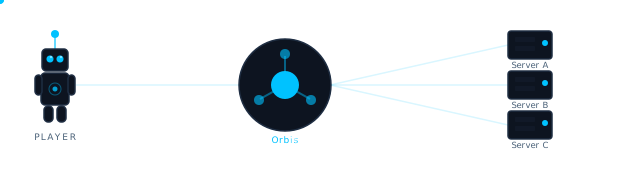
OrbisManager supports two setups depending on how you want to structure your network.
OrbisManager does not act as a proxy. All player connections are native Hytale connections. When a player is redirected, their client receives a ClientReferral and connects directly to the target server.
Direct Server Connection
Each Hytale Game Server runs OrbisMod. Players connect via IP or hostname. The mod evaluates routing rules and either lets the player join, disconnects them, or redirects via a native ClientReferral.
With OrbisRouter
OrbisRouter is an optional routing gateway. Players connect via hostname (e.g. play.example.com) and OrbisRouter evaluates routing rules to send players to the right server via ClientReferral.

Getting Started

- Create an account at orbismanager.ricosw.de
- Follow the onboarding guide — create your first project, add a server, and download the mod config
- Place the mod and config on your Hytale server
- Start configuring routing rules from the dashboard